CS2 Commendbot implemented into our CS2 Cheats
- Thread starter Xarina
- Start date
Best undetected CS2 Cheats & Free CS2 Hacks
Anyx.gg is offering the best undetected CS2 Cheats and also an undetected free CS2 Hack! Counter-Strike Cheating Experience since 2017!
SignUp Now!You are using an out of date browser. It may not display this or other websites correctly.
You should upgrade or use an alternative browser.
You should upgrade or use an alternative browser.


- Joined
- Apr 23, 2024
- Messages
- 2
how do i open the console?Dear Community, we have just implemented a Commendbot for CS2 in our cheats.
Premium users will automatically receive a balance after purchasing our CS2 Premium Cheat:
1 Month = 50 Commends
3 Months = 200 Commends
Lifetime = 500 Commends
Of course you can buy additional ingame Commends in our store:
Buy CS2 Commends
CS2 Commendbot Showcase / Tutorial
1. Make sure you are at the CS2 Main Menu and open the Commendbot Tab in the CS2 Cheat
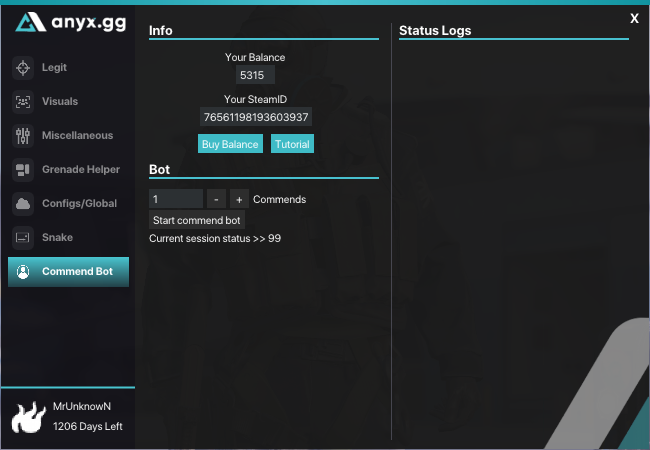
2. Enter the balance you want and hit "Start commend bot"
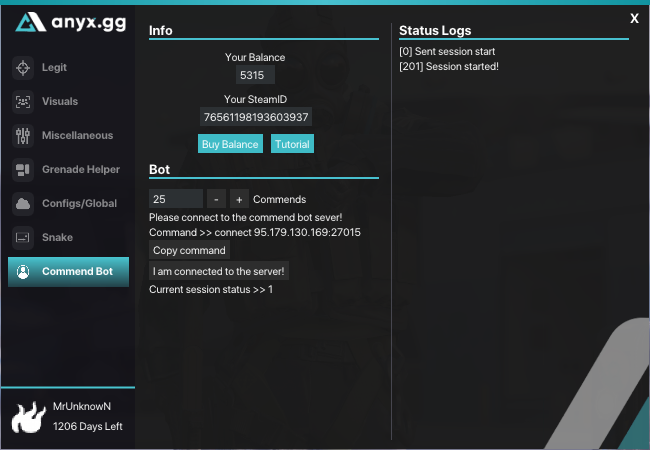
3. Open the CONSOLE and click on "Copy command" and paste it into the CONSOLE. Press Enter to "connect" to the Server.
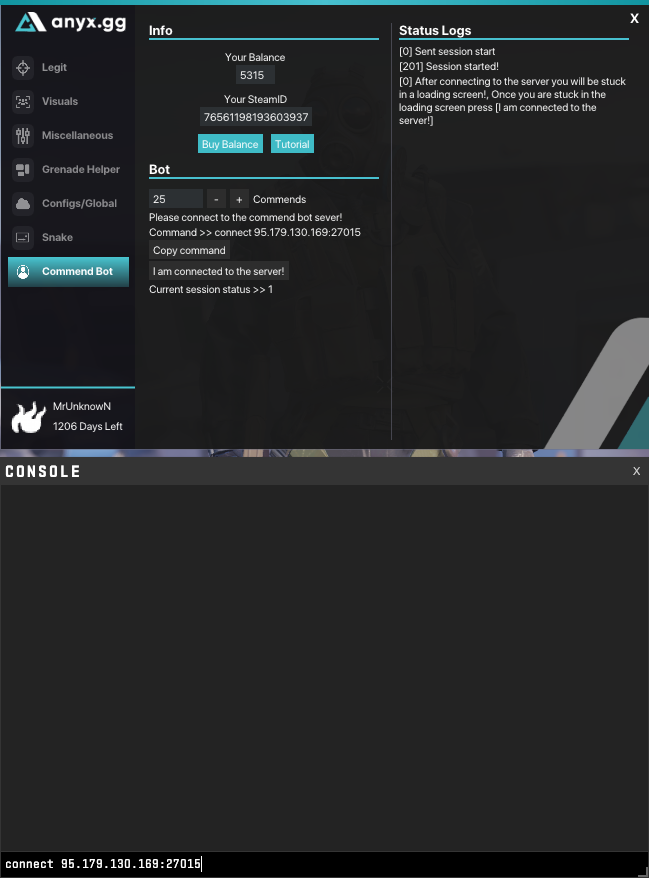
4. Now youre stuck at the loading Screen. Press now "I am connected to the server!" Your session is now started.
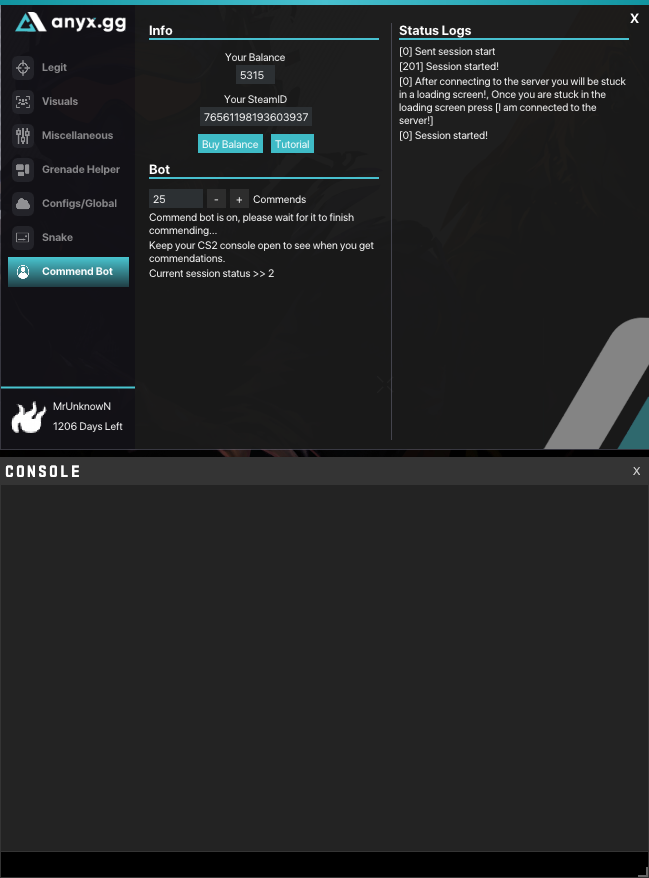
5. You will receive now every 5 minutes a chunk with a maximum of 20 ingame commends. Wait until the session is finished.
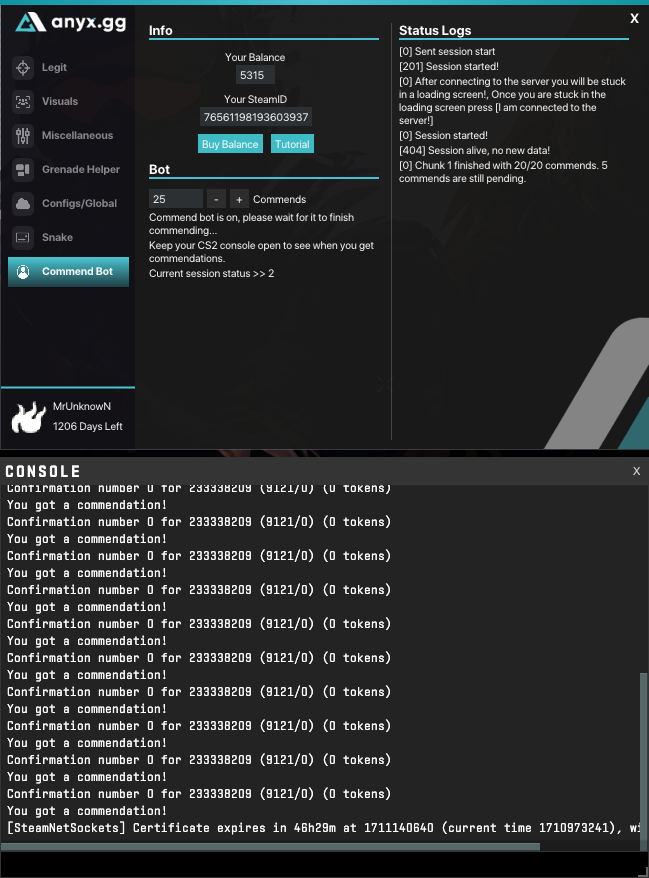
6. Session finished. You received now all commends. You can type now "disconnect" to leave the loading screen.
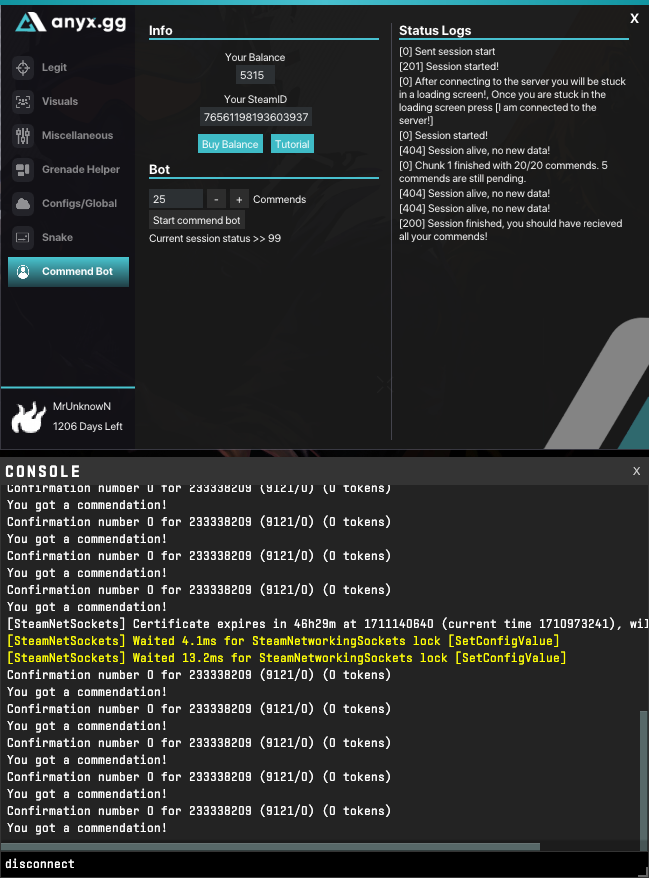
7. Thanks for using our Commendbot for CS2. You can also watch our Video Guide below!

- Joined
- Jan 11, 2022
- Messages
- 445
how do i open the console?
enable to developer console in your cs2 settings. then you can start the cs2 commendbot - have fun
theone6969
New member
- Joined
- Jan 2, 2025
- Messages
- 1
hi idk if is a bug or something but i wait like 15/20 min and no commends onlint no new data
somekid111
ANYX Customer
- Joined
- Dec 13, 2024
- Messages
- 15
it does work but i had to do 3 or 4 a day other wise it just stopped
csukrika1234
New member
- Joined
- Mar 6, 2025
- Messages
- 1
hi, i followed every step and im not getting the commandations. can you me to get them?

- Joined
- Jan 17, 2025
- Messages
- 2
what do i get when i do that? i dont understand it for what it is forDear Community, we have just implemented a Commendbot for CS2 in our cheats.
Premium users will automatically receive a balance after purchasing our CS2 Premium Cheat:
1 Month = 50 Commends
3 Months = 200 Commends
Lifetime = 500 Commends
Of course you can buy additional ingame Commends in our store:
Buy CS2 Commends
CS2 Commendbot Showcase / Tutorial
1. Make sure you are at the CS2 Main Menu and open the Commendbot Tab in the CS2 Cheat
2. Enter the balance you want and hit "Start commend bot"
3. Open the CONSOLE and click on "Copy command" and paste it into the CONSOLE. Press Enter to "connect" to the Server.
4. Now youre stuck at the loading Screen. Press now "I am connected to the server!" Your session is now started.
5. You will receive now every 5 minutes a chunk with a maximum of 20 ingame commends. Wait until the session is finished.
6. Session finished. You received now all commends. You can type now "disconnect" to leave the loading screen.
7. Thanks for using our Commendbot for CS2. You can also watch our Video Guide below!
iFastSkills
ANYX Customer
- Joined
- May 28, 2025
- Messages
- 1
Hello, i bought 1 month key, and didn't use the balance on the commendation, can i still use it?
- Joined
- Jan 11, 2022
- Messages
- 445
Hello, i bought 1 month key, and didn't use the balance on the commendation, can i still use it?
Sure, contact us via support ticket if you still have the issue!
- Joined
- Oct 22, 2023
- Messages
- 1
cette fonctionalité ne marche pas je ne reçoit pas mes commendChère communauté, nous venons d'implémenter un Commendbot pour CS2 dans nos cheats .
Les utilisateurs Premium recevront automatiquement un solde après l'achat de notre CS2 Premium Cheat :
1 mois = 50 félicitations
3 mois = 200 félicitations
Durée de vie = 500 félicitations
Bien sûr, vous pouvez acheter des Commends supplémentaires dans le jeu dans notre boutique :
Acheter CS2 Commends
Présentation/Tutoriel CS2 Commendbot
1. Assurez-vous que vous êtes dans le menu principal de CS2 et ouvrez l'onglet Commendbot dans le Cheat CS2
2. Saisissez le solde souhaité et cliquez sur « Démarrer le robot de commande »
3. Ouvrez la console, cliquez sur « Copier la commande » et collez-la dans la console. Appuyez sur Entrée pour vous connecter au serveur.
4. Vous êtes maintenant bloqué sur l'écran de chargement. Cliquez sur « Je suis connecté au serveur ! » Votre session est lancée.
5. Vous recevrez désormais toutes les 5 minutes un bloc contenant un maximum de 20 mentions en jeu. Attendez la fin de la session.
6. Session terminée. Vous avez reçu toutes les félicitations. Vous pouvez maintenant saisir « déconnecter » pour quitter l'écran de chargement.
7. Merci d'utiliser Commendbot pour CS2. Vous pouvez également visionner notre guide vidéo ci-dessous !
- Joined
- Mar 8, 2025
- Messages
- 2
I didn't recieve Lifetime = 500 Commends.Dear Community, we have just implemented a Commendbot for CS2 in our cheats.
Premium users will automatically receive a balance after purchasing our CS2 Premium Cheat:
1 Month = 50 Commends
3 Months = 200 Commends
Lifetime = 500 Commends
Of course you can buy additional ingame Commends in our store:
Buy CS2 Commends
CS2 Commendbot Showcase / Tutorial
1. Make sure you are at the CS2 Main Menu and open the Commendbot Tab in the CS2 Cheat
2. Enter the balance you want and hit "Start commend bot"
3. Open the CONSOLE and click on "Copy command" and paste it into the CONSOLE. Press Enter to "connect" to the Server.
4. Now youre stuck at the loading Screen. Press now "I am connected to the server!" Your session is now started.
5. You will receive now every 5 minutes a chunk with a maximum of 20 ingame commends. Wait until the session is finished.
6. Session finished. You received now all commends. You can type now "disconnect" to leave the loading screen.
7. Thanks for using our Commendbot for CS2. You can also watch our Video Guide below!
- Joined
- Mar 8, 2025
- Messages
- 2
I didn't recieve Lifetime = 500 CommendsDear Community, we have just implemented a Commendbot for CS2 in our cheats.
Premium users will automatically receive a balance after purchasing our CS2 Premium Cheat:
1 Month = 50 Commends
3 Months = 200 Commends
Lifetime = 500 Commends
Of course you can buy additional ingame Commends in our store:
Buy CS2 Commends
CS2 Commendbot Showcase / Tutorial
1. Make sure you are at the CS2 Main Menu and open the Commendbot Tab in the CS2 Cheat
2. Enter the balance you want and hit "Start commend bot"
3. Open the CONSOLE and click on "Copy command" and paste it into the CONSOLE. Press Enter to "connect" to the Server.
4. Now youre stuck at the loading Screen. Press now "I am connected to the server!" Your session is now started.
5. You will receive now every 5 minutes a chunk with a maximum of 20 ingame commends. Wait until the session is finished.
6. Session finished. You received now all commends. You can type now "disconnect" to leave the loading screen.
7. Thanks for using our Commendbot for CS2. You can also watch our Video Guide below!
SenioRobert
ANYX Customer
- Joined
- Oct 2, 2025
- Messages
- 1
just got into the game and wanted to make some commendations
(0) This profile is already getting botted.
(404) session alive, no new data
and repeats the code ....i waited 10 minutes and nothing happened...what is to do ? i had 50 points
(0) This profile is already getting botted.
(404) session alive, no new data
and repeats the code ....i waited 10 minutes and nothing happened...what is to do ? i had 50 points
- Joined
- Oct 6, 2025
- Messages
- 1
same thing for me i made a ticket hopefully they respondis not working for me I don’t know why
View attachment 5983
- Joined
- Sep 5, 2024
- Messages
- 3
They told me they don’t know when will be done but they are working on itsame thing for me i made a ticket hopefully they respond
 ive lost a lot of balance to this.
- Joined
- Jan 11, 2022
- Messages
- 445
its working again!They are working on it the last time I spoke with them they told me will be working but they don’t know estimate time
About anyx.gg
Anyx.gg is the biggest CS2 Cheat Provider for Counter-Strike 2 Hacks on the market. More than 250.000 Members trust in the experience. CS2 Cheats expierence since 2017!